• Welcome to Photrio!
    Registration is fast and free. Join today to unlock search, see fewer ads, and access all forum features.
    Click here to sign up

Building a darkroom

Texas

A
Texas

  • 3
  • 1
  • 49

Forum statistics

Threads
203,431
Messages
2,854,512
Members
101,836
Latest member
sukasaurus
Recent bookmarks
0
Plastic coated home electric blankets are so cheap and work. Available anywhere.
 
Great. The M805 is a good enlarger but it isn`t essential to enlarge 6x6 negatives. Too much money, there are many other perfectly good enlargers for a fraction of the cost.

My advice is always to start with a reasonable minimum amount of gear, and gradually get what you learn it`s needed for your specific task.

So, I`d start with a set of trays, 8x10" (20x25 centimeters). After that, you`ll know if you prefer 11x14", 16x20" or whatever. One note; I like to have at least FIVE trays (dev, stop, fixer 1, water, fixer 2... you can use them too for washing aid, toning, to hold finished prints, etc., etc...).

Two tweezers are enough, one to take the print from the dev to the stop, another for the rest.

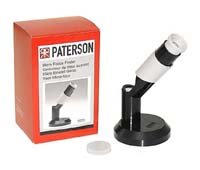
Cheap Paterson grain focusers are perfectly right, you don`t need a fancy expensive enlarging loupe since the first day. After 30+ years I still use them.

Have you mentioned a thermometer? Essential for film developing, good for prints if the darkroom temperatures go too high or low. A tray warmer isn`t a must unless temperature get too low.

Two safelights, bulbs are right. Filtered safelights are better, you can change the bulb output if needed, more durable. After a few printing sessions you`ll know if you need more.

For serious printing on fiber based papers a print washer is essential. Archival quality prints have to be properly washed, a dedicated tool will save loads of time (and water!) and will assure the process. You can homemade one (they are expensive!).
Resin coated papers are much easier/faster to wash; as a starter you can skip the washer and print mostly on RC papers.

Durst "analog" timers (Labotim and alike) are dirty cheap secondhand and work. You can use them for factorial timing with a printed wheel over them.

Check if you need any blackout tape or fabric (door, window, enlarger`s head).

Very important; if you plan to have a permanent darkroom, think on hygienic procedures. Plan an air inlet, buy a exhaust fan, don`t leave it for tomorrow, think about it. Darkroom chemicals are harmful, you actually don`t need to smoke their fumes.
Buy gloves right now (nitriles are best) and don`t even touch a bottle without them on; get used to them since the first day. Use a face mask when working with powders.

Jose,

Thank you for taking your time and sharing your wealth of experience!

BR,

Jonas
 
So, now the question is. Should I use my color heat to adjust contrast or get the Ilford filter set.

As I understand, I need to make curves to be able to adjust the contrast in a reproducible manner without changing the exposure. This means I need to get a step wedge and use expensive materials and that I need to do this for every single type of paper I decide to use.

With the filters, I immediately know which contrast grade I get and how to adjust exposure (no change for 00 - 3 1/2, double exposure for 4 - 5). Is it worth the 99 EUR?

BR,

Jonas
 
So, now the question is. Should I use my color head to adjust contrast or get the Ilford filter set.

As I understand, I need to make curves to be able to adjust the contrast in a reproducible manner without changing the exposure. This means I need to get a step wedge and use expensive materials and that I need to do this for every single type of paper I decide to use.

The colour head will be just fine for variable contrast papers. No need to go out buying the Ilford filters.

You will find most (all ?) VC papers come with an information sheet detailing the CMY settings to use in order to print at each grade. The tables will usually give an indication of any exposure compensation.

If you find you can not hit G5 with the colour head and built in filtration, using the Ilford filters will not help - Not being able to get G5 is usually an indication that the halogen lamp is in need of replacement (always worth having a couple of spares on the shelf).
 
WHITE PAINT

I recommend you paint your darkroom WHITE, except for the area adjacent to the enlarger which should be flat black.
A white darkroom is much easier to work in than a black one. And your safe light being reflected off the white walls, means you do not need to use as many/much safe lights as in a black darkroom. I used only two 7-1/2 watt bulb safe lights for my darkroom (white walls, floor tiles and counter top). The white surfaces bounced the safe light around so there were no dark spots. It was quite pleasant to use, compared to the cavern of a black darkroom.


re: powdered chemicals.
Mix them OUTSIDE the darkroom, so any chemical dust is not added to the darkroom environment to deal with.
 
So, now the question is. Should I use my color hea(d) to adjust contrast or get the Ilford filter set.

As I understand, I need to make curves to be able to adjust the contrast in a reproducible manner without changing the exposure. This means I need to get a step wedge and use expensive materials and that I need to do this for every single type of paper I decide to use.

With the filters, I immediately know which contrast grade I get and how to adjust exposure (no change for 00 - 3 1/2, double exposure for 4 - 5). Is it worth the 99 EUR?

BR,

Jonas

The "no change for 00 - 3 1/2, double exposure for 4 - 5" only works with respect to a single, mid-gray tone.

It will give you a good place to start, but it rarely allows you to change contrast and end up with a final print on the first try.

The tables that paul_c5x4 refers to will give you something close to the same thing, but relying on them negates one of the advantages of an infinitely adjustable colour head - it is helpful to not have fixed grades, and to have instead the ability to make slight increases or decreases in the dialed in contrast.
 
You don`t need to keep exposure time constant. And don`t mind if the higher contrast grade exposures are not double (they actually never are!).
You`ll need a proof or test print *almost* every time you made a change in exposure or contrast... unless you were looking for speed.

Maybe not right now, but it is very interesting to use different contrast values on the same print. It means to change the filters or to set the controls to another value without removing the paper. Usually, it`s easier to move the yellow and magenta dials than to open a filter drawer (remove the filter, put another one, and close the drawer)... well, the below-the-lens filters` are easier to handle.

Just print a filtering chart big enough to be readable in the darkroom (as mentioned, you have them into the paper instructions), and hang it near your enlarger. It`s very likely that you`ll use exactly the same filtering steps than the ones on Multigrade filter sets (1/2 steps).

I`d start working (printing); as a starter, you don`t need to make any curve.
 
Last edited by a moderator:
The "no change for 00 - 3 1/2, double exposure for 4 - 5" only works with respect to a single, mid-gray tone.

It will give you a good place to start, but it rarely allows you to change contrast and end up with a final print on the first try.

The tables that paul_c5x4 refers to will give you something close to the same thing, but relying on them negates one of the advantages of an infinitely adjustable colour head - it is helpful to not have fixed grades, and to have instead the ability to make slight increases or decreases in the dialed in contrast.

Time is constant if you want greys to be the same. Nobody prints to keep grey constant. They print to keep blacks the same or whites the same. Work out a chart . If I remember correctly, when raising contrast, you need more time to keep whites the same, less time when lowering, & the blacks fall where you want.

3.5x, 5x7, 8x10, 11x14, 16x20 in inches all require one stop more exposure than the next lower size. 6x6 negs are different ratio. Doubling time is not the same as opening one stop due to reciprocity failure of the paper.

You will never get a flat print from FB paper by hanging it. Search the archives and you will find methods that do.

RC paper dries flat no matter what.
 
No one has mentioned hypo eliminator to speed washing. Generally, for final prints, using a two bath fix and hypo eliminator is more efficient. First bath fix is older and the second fresh bath removes the residual silver more completely. The prints can be held after the first bath and then they all can be agitated in the second fix bath before the hypo elimination and wash.

Adams used two fix baths and then a combined selenium toner/hypo eliminator bath before the final wash.

Then you need a print drying rack or some other way to dry the prints.

I have a weston quick reading thermometer and then a Kodak color thermometer to backup/check/calibrate the weston.
 
Paterson makes a nice small grain focuser with a sliding cover to keep the mirror clean. Called the Paterson Micro Focus Finder . paterson.jpeg
 
The combined bath is Rapid Selenium Toner KRST and Hypo Clearing Agent KHCA (not the same as HE-1). KRST has fixer in it so after treatment you need to rinse again and treat in straight KHCA and wash.
 
Photrio.com contains affiliate links to products. We may receive a commission for purchases made through these links.
To read our full affiliate disclosure statement please click Here.

PHOTRIO PARTNERS EQUALLY FUNDING OUR COMMUNITY:


Ilford ADOX Freestyle Photographic Stearman Press Weldon Color Lab Blue Moon Camera & Machine
Top Bottom