
• Welcome to Photrio!
    Registration is fast and free. Join today to unlock search, see fewer ads, and access all forum features.
    Click here to sign up

Brown edges on print - fixer problem? What's going on?

Forum statistics

Threads
201,217
Messages
2,820,608
Members
100,590
Latest member
Contaxisfragile
Recent bookmarks
1

insertclevername

Member
Allowing Ads
Joined
Jul 16, 2009
Messages
10
Location
Spokane, Wa
Format
35mm
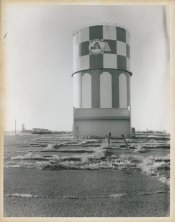
I keep getting these brown edges on my prints. At first I thought it was my fixer so I replaced that. That usually solved the problem but for the print I scanned and attached, that didn't help. In fact, after a change of fix, the problem was worse than before.

About my processing. I'm using a Jobo drum attached to a cpe2 processor. I dilute my fixer 1+9 if that helps to know. Everything is kept at 68F.

Anyone have any clue what is going on?
 

Attachments

  • img548.jpg
    img548.jpg
    57.5 KB · Views: 362

bdial

Subscriber
Joined
Jan 2, 2005
Messages
7,507
Location
North East U.S.
Format
Multi Format
Looks like a fixer problem.
How long are you fixing?
What paper?
Do you use a stop?
What fixer?
How much fix are you using?

For example, if you are using an acid fix and no stop, and little volume, you could easily wipe out the fix from developer carry-over. But there are lots of possibilities as to what the specific problem might be. More info will help.
 

jgjbowen

Member
Allowing Ads
Joined
Oct 13, 2003
Messages
879
Location
Richmond, VA
Format
Large Format
Yes, what paper? How old is the paper? How long is the paper in the soup?

The easiest way to eliminate your fixer is to tear a UNEXPOSED piece of photo paper in half. Place 1/2 directly in the fix and process the other 1/2 as you normally would (develop, stop, fix) then compare the two.

I believe you are experiencing chemical fog. Add some Benzotriazole (mixed in a 2% solution) to your developer. I had a similar issue recently and 30ml of B'zol/liter of developer was insufficient. 60ml of 2% B'zol per liter of developer cleared up my fogging.

The B'zol will also change your print color to a cooler color. You may have to add some additional KBr to your developer to warm the print color. Again, it all depends on the paper/developer and desired print color.

This chemical fogging will become more of an issue as we use older papers. Fred Picker used to champion using about 1/4 oz of 2% B'zol in every tray of paper developer. You may like the change in print color and the B'zol will certainly help keep those whites as bright as possible.

Please let us know what you find.
 
Last edited by a moderator:

jnovek

Member
Allowing Ads
Joined
Oct 13, 2007
Messages
22
Format
Multi Format
This is totally an anecdote, and I have no good explanation for why this occurs. However, I can tell you what I've done to solve it.

In my experience it occurs before fixing. I have done a test print, stopped it and then turned on the room lights in the darkroom to confirm this. Any tray or bottle can be contaminated, though, so where the problem occurs may just be a result of your darkroom process.

I strongly suspect that in my case, I have an unholy combination of fixer and indicator stop bath working its way back into the developer. In my experience, the print has a mild oder of sulfur and ammonia.

I have experienced this in my drum processor, too. I think it occurs when the drum has not been properly cleaned on a previous printing session. I have replaced all chemicals and doubled rinsing time to no avail. When the drum is the culprit, the only solution has been to scrub the drum and the reservoirs. Note, I use a Unicolor system, not a Jobo system; I'm not entirely sure how a Jobo system works so you may need to do some additional cleaning.

It would be nice if I could say that this has caused me to improve my darkroom cleaning habits, but that would make me a liar :smile:.

Jason
 

Ian Grant

Subscriber
Allowing Ads
Joined
Aug 2, 2004
Messages
23,370
Location
West Midland
Format
Multi Format
Looks like poor fixing causing the problem, my guess is that you should add a good stop bath if you don't use one already. It looks as though between developing and complete fixing your getting a developer/fixer interaction causing the staining.

Adding Benzotriazole or Bromide isn't going to help at all, the issue is the time delay between pouring out of the dev and the fixer working effectively. the lower dilution 1+9 won;t be helping. Think logically in tray processing a print goes from dev to stop in less tah 5 seconds, in you tank situation it's far longer, perhaps 30 seconds and if there's no stop-bath you will have problems with contamination.

Ian
 

ooze

Member
Allowing Ads
Joined
Nov 22, 2004
Messages
430
Location
Istanbul/DĂĽsseldorf
Format
Multi Format
In case this is one of the last batches of Forte paper, then it is the paper. I have several packets of Forte paper left and get brown edges a couple of days after the print has dried. No matter what I tried, I couldn't get rid of the stain :sad:
 

fschifano

Member
Allowing Ads
Joined
May 12, 2003
Messages
3,196
Location
Valley Strea
Format
Multi Format
I've had a similar problem as jnovek, except that the stains on my prints were in the form of fingerprints. I was handling prints going from the stop bath to the fixer with developer contaminated hands. Same color stains, different shape. Look to your darkroom hygiene habits to solve this one.
 
OP
OP

insertclevername

Member
Allowing Ads
Joined
Jul 16, 2009
Messages
10
Location
Spokane, Wa
Format
35mm
More info: Paper is Ilford Multigrade IV RC. The paper is fresh. I am using an acid stop bath. Fix time is 2 minutes.

After reading all of your replies, I'll try cleaning my drum more thoroughly in between prints. I'll also increase the time of my stop bath from 30 seconds to one minute. Hopefully doing all this will help.
 

dancqu

Member
Allowing Ads
Joined
Sep 7, 2002
Messages
3,649
Location
Willamette V
Format
Medium Format
More Than Enough Time

More info: Paper is Ilford Multigrade IV RC.
The paper is fresh. I am using an acid stop
bath. Fix time is 2 minutes.

Both Kodak and Ilford: PAPER STRENGTH is 1:7 and 1:9
respectively. There is good reason for those dilutions.

From considerable personal experience I do know that
fixers can be used at almost any dilution. Fix times
increase with dilution. A certain minimal amount
of the chemistry must be present for
a thorough fixing.

Your brown borders only are a puzzle. Were the white
areas within the body of the print also of warm hue
I'd think it a fixer problem. Does that rotary
method inhibit circulation in that very
defined border area? Dan
 

Neal

Subscriber
Allowing Ads
Joined
Dec 3, 2004
Messages
2,026
Location
Chicago, West Suburbs
Format
Multi Format
Dear insertclevername,

I have had similar problems when working in a community darkroom. Each time a thorough cleaning of the trays eliminated the staining.

Good luck,

Neal Wydra
 

Dali

Member
Allowing Ads
Joined
Jun 17, 2009
Messages
1,871
Location
Philadelphia
Format
Multi Format
Hi,

I had a similar issue with Oriental VC paper. Stains were always on the edge, never in the middle of the sheet (fortunately).

I switched to Ilford Multigrade FB several years ago and never had such trouble since.

Apart from this change, I use the same lab gear and my fixing procedure is identical.

So, I lean towards a paper issue more than a fixer one.
 

naugastyle

Member
Allowing Ads
Joined
Sep 16, 2009
Messages
357
Location
Brooklyn, NY
Format
35mm
I had this issue yesterday with Oriental WT paper, on one print only. I usually wait at least 30 seconds before turning on the light to inspect prints, and fix for 5 minutes or more. Yesterday printed in Forte Polywarmtone, Oriental Seagull, Adox MCC, and 3 prints on Oriental WT and only got the one with this brownish edge. The only other times I've gotten it have also been on Oriental WT but again, not on every print. I've tried re-fixing them all but it doesn't seem to do any good. Mine is also never all the way around the print, just along one edge.
 

Dali

Member
Allowing Ads
Joined
Jun 17, 2009
Messages
1,871
Location
Philadelphia
Format
Multi Format
naugastyle, I had trouble with several Oriental paper batches, not all of them. I don't think fixer has to do with it as I always process the same way whatever paper brand I use and I always wait for 2 minutes before turning on the light. Never had trouble with Ilford papers nor Agfa but when Agfa discontinued their fiber VC paper, I switched to Oriental and it is when started my troubles...
 

TimVermont

Member
Allowing Ads
Joined
Mar 8, 2005
Messages
468
Location
Boston
Format
Multi Format
Run a piece of exposed paper through your process in the drum, then rinse & clean as usual. Now take a clean white tissue and rub it in the JoBo drum, especially along the ribs. I'm betting you'll get goo/staining on the tissue. Now rinse the tank (and JoBo lift if you are using one) with half hot water and half bleach, then clean water, and try the tissue test again. When I had to use drums because I didn't have room for trays I had to add a hot water, bleach, water rinse in order to get clean prints.
 

BetterSense

Member
Allowing Ads
Joined
Aug 16, 2008
Messages
3,151
Location
North Caroli
Format
35mm
I've had brown stains just like that, only on the edges, on RC papers. I never figured out what was causing it. After reading this thread I think I will keep my trays cleaner and make sure to stop more thoroughly. I often pass the print through the stop very quickly rather than stop for the full 30s.
 
Photrio.com contains affiliate links to products. We may receive a commission for purchases made through these links.
To read our full affiliate disclosure statement please click Here.

PHOTRIO PARTNERS EQUALLY FUNDING OUR COMMUNITY:


Ilford ADOX Freestyle Photographic Stearman Press Weldon Color Lab Blue Moon Camera & Machine
Top Bottom
