• Welcome to Photrio!
    Registration is fast and free. Join today to unlock search, see fewer ads, and access all forum features.
    Click here to sign up

Best screen resolution for RAW files

Recent Classifieds

Forum statistics

Threads
202,671
Messages
2,843,851
Members
101,452
Latest member
LookThroughTheLens
Recent bookmarks
0

Nikon 2

Subscriber
Allowing Ads
Joined
Feb 19, 2023
Messages
1,658
Location
Moyers, Oklahoma
Format
Multi Format
Opinions on what screen resolution is best for observing RAW files…📷
 
I use a 65 inch 4K TV that I am 5 feet away from. 4K helps in this situation because the TV is taking up about 90 degrees of my angle of view. If your screen takes up less than 90 degrees of your view, 4K is probably overkill.
 
How long is a piece of string?

Depends on expectations/requirements, viewing distance, screen size and your own ability to discern fine detail.
 
Opinions on what screen resolution is best for observing RAW files…📷

I think it depends on how large the monitor is and how close you sit to it. IMO a HD monitor won’t cut it. I have an Eizio CS2730 2660 x 1440. I sit 18” away and if I get any closer I can start to see the pixel grid. It has served me well for personal and professional work, but when I upgrade I’ll most likely go with a larger 4K display.
 
I use a 65 inch 4K TV that I am 5 feet away from. 4K helps in this situation because the TV is taking up about 90 degrees of my angle of view. If your screen takes up less than 90 degrees of your view, 4K is probably overkill.

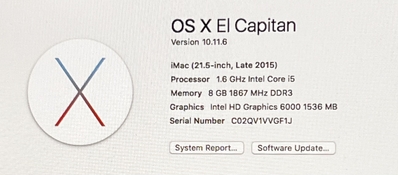
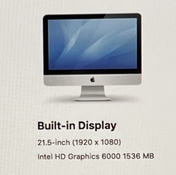
I’m using an old 2015 Mac desktop that’s 21.5” with a display of (1920 x 1080) to view RAW files…📷
 
I think it depends on how large the monitor is and how close you sit to it. IMO a HD monitor won’t cut it. I have an Eizio CS2730 2660 x 1440. I sit 18” away and if I get any closer I can start to see the pixel grid. It has served me well for personal and professional work, but when I upgrade I’ll most likely go with a larger 4K display.

My monitor, a 2015 21.5” (1920x1080) display that sits on a desk a few feet from me…📷
 
How long is a piece of string?

Depends on expectations/requirements, viewing distance, screen size and your own ability to discern fine detail.

A 2015 MAC desktop with a 21.5” (1920x1080) display @ a few feet from me, with no strings attached…📷
 
How long is a piece of string?

This makes me chuckle as I remember a test question my son got marked wrong on his 7th grade science final: How many inches are on a ruler? And when the teacher was questioned about it she replied that the class used 6-inch rulers on an experiment so it was a valid question.
 
A 4k res monitor supports 3840 x 2160 pixels...about 8.8 MPixels, about 37" wide for 42" monitor...a pixel pitch of 0.00964"

The human eye has resolution of about 0.5 minutes of arc. At a distance of 10' (3m), that computes to being able to resolve 0.014"...so the 42" diagonal 4k monitor has better resolving power than your eye can perceive at 10' distance, but even a 42" 4k monitor cannot resolve what a 15 year old digital camera can resolve!

Change the size of the monitor and/or your viewing distance, and the math tells the story.

A 21" 1920 pixel wide monitor is (guessing about 18.5: wide, so its pixel pitch is 0.00964"...you could sit 66" away from the monitor and only just be able to detect individual pixels on the monitor, and any photo resolution more than 2 MPixels would be wasted on that display if you view the entire frame on it.
 
Last edited:
This makes me chuckle as I remember a test question my son got marked wrong on his 7th grade science final: How many inches are on a ruler? And when the teacher was questioned about it she replied that the class used 6-inch rulers on an experiment so it was a valid question.

Wondering how many are going to string together on this one…🤓
A 4k res monitor supports 3840 x 2160 pixels...about 8.8 MPixels, about 37" wide for 42" monitor...a pixel pitch of 0.00964"

The human eye has resolution of about 0.5 minutes of arc. At a distance of 10' (3m), that computes to being able to resolve 0.014"...so the 42" diagonal 4k monitor has better resolving power than your eye can perceive at 10' distance, but even a 42" 4k monitor cannot resolve what a 15 year old digital camera can resolve!

Change the size of the monitor and/or your viewing distance, and the math tells the story.

A 21" 1920 pixel wide monitor is (guessing about 18.5: wide, so its pixel pitch is 0.00964"...you could sit 66" away from the monitor and only just be able to detect individual pixels on the monitor, and any photo resolution more than 2 MPixels would be wasted on that display if you view the entire frame on it.
I measured the width of the image to less than 16”.
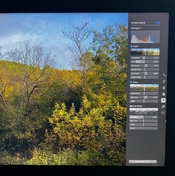
Wow, the RAW images look amazing on that screen! Imagine how they would look on a 4K monitor…📷
 
I think that most modern screen resolutions would do. What is more important in my opinion is whether the screen is calibrated and the software used to view the RAW files. What is your intent? For editing/adjusting the files? Or just viewing. My experience is that RAW files straight from the camera benefit from at least a camera profile applied.
 
I think that most modern screen resolutions would do. What is more important in my opinion is whether the screen is calibrated and the software used to view the RAW files. What is your intent? For editing/adjusting the files? Or just viewing. My experience is that RAW files straight from the camera benefit from at least a camera profile applied.

Viewing and some adjustments that the computer allows…📷
 
The desktop I’m using is so obsolete that LR or other software can’t be downloaded, so whatever adjustments I can use are tools already installed …📷
 
Last edited:
"Don’t want to sound ignorant but what do you mean…📷"
Do an online search for, "how do I calibrate my monitor?"

"The desktop I’m using is so obsolete that LR or other software can’t be downloaded…📷"
Generally speaking, RAW files are of most interest to people who want to edit digital photographs. Which requires some kind of editing software that must support the RAW files from your particular brand and model of camera.

What operating system and version is your computer running, and what is the name of your editing software?

The monitor calibration process will enable you to keep/control color and shadow and highlight details in your edited images. To get the full benefit of a calibrated monitor, your editing software should support color management. You could do an online search for "color management" but it is not an easy topic to understand. And perhaps not worth the effort for many casual photographers?
 
Last edited:
"Don’t want to sound ignorant but what do you mean…📷"
Do an online search for, "how do I calibrate my monitor?"

"The desktop I’m using is so obsolete that LR or other software can’t be downloaded…📷"
Generally speaking, RAW files are of most interest to people who want to edit digital photographs. Which requires some kind of editing software that must support the RAW files from your particular brand and model of camera.

What operating system and version is your computer running, and what is the name of your editing software?

The monitor calibration process will enable you to keep/control color and shadow and highlight details in your edited images. To get the full benefit of a calibrated monitor, your editing software should support color management. You could do an online search for "color management" but it is not an easy topic to understand. And perhaps not worth the effort for many casual photographers?
 

Attachments

  • IMG_6867.jpeg
    IMG_6867.jpeg
    507 KB · Views: 154
  • IMG_6868.jpeg
    IMG_6868.jpeg
    232 KB · Views: 163
  • IMG_6870.jpeg
    IMG_6870.jpeg
    831.6 KB · Views: 165
A fully calibrated, colour managed system is critical to obtaining prints that match how an image appears on your monitor.
And if you want to share images digitally, and want others to see the same things that you see, in the way that you see them, both your system and their system needs to be both colour managed and calibrated.
 
A fully calibrated, colour managed system is critical to obtaining prints that match how an image appears on your monitor.
And if you want to share images digitally, and want others to see the same things that you see, in the way that you see them, both your system and their system needs to be both colour managed and calibrated.

And how to do this is my question…📷
 
L1000510.jpeg

How does this appear on your end of the spectrum…📷
 
Probably different than it does for you.
 
The advantage of RAW files is that somewhat like a film negative, there is leeway for adjustment and interpretation. With a RAW file, one can adjust the overall exposure over a range of 5 or 6 stops, separately adjust highlights and shadows (not to be confused with contrast), individually adjust colors, clarity, sharpness and overall color temperature and much more, depending on the program. Not the kind of adjustments that you will find in Apple Photos or Preview which probably convert your RAW image to something else in order to edit. Most programs that deal with RAW files are non-destructive, they keep the original and the adjustments can be changed at any time. I may be mistaken, but RAW files need to be exported or converted in order to print them or use them in page layout programs such as InDesign. And by posting an image and asking, how does this look for you does no good unless we know how it looks to you and if that is what is seen on your screen and what your expectations might be. Besides, anything posted on a site is no longer a RAW file, but something the internet has mangled so it can handle it.
 
Photrio.com contains affiliate links to products. We may receive a commission for purchases made through these links.
To read our full affiliate disclosure statement please click Here.

PHOTRIO PARTNERS EQUALLY FUNDING OUR COMMUNITY:



Ilford ADOX Freestyle Photographic Stearman Press Weldon Color Lab Blue Moon Camera & Machine
Top Bottom