


• Welcome to Photrio!
    Registration is fast and free. Join today to unlock search, see fewer ads, and access all forum features.
    Click here to sign up

Artifacting problems with Silverfast

Forum statistics

Threads
203,511
Messages
2,855,763
Members
101,876
Latest member
GUOWEN
Recent bookmarks
0

Tumbles

Member
Joined
Apr 20, 2016
Messages
158
Location
SF Bay Area
Format
Med. Format RF
I've been getting these pixelated artifacts with Silverfast on my Nikon Coolscan 9000. I originally thought it had something to do with it not being set to fine scan. It had problem like this when I was using the original software.

I changed the setting and continued on. On scans with higher grain it can be very hard to detect. I recently spotted it again after I scanned some finer grained film. I went through a lot of testing and tracked it down to occurring when the images are set to 48bit. It's fine when they're set to 24bit. I found that I can get artifact free 48bit images if I scan as HRD Raw and then save images from that. That's more work than I'd prefer to do.

Has anyone dealt with this before and found a work around? I'm a 1000 images in with this problem. I looked over some of my scans and it really stands out on my 35mm slides.

48bit vs 24bit scan
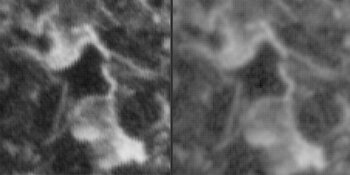
compare.jpg
 
The problem appears to be an aliasing issue. I don't see how 48bit vs. 24bit explains the difference. Also, contrast is different in both examples. My guess is that there are other parameters that are different between the scans and I don't think it's the bit depth that is the direct issue here. If this is truly a direct result of bit depth then it's basically a bug in how the software processes the image data as there's no reason why increasing bit depth would result in aliasing.

Does the scan profile you use for the 48bit scans also involve a different setting for sharpening, detail recovery, noise reduction or any other parameter that might affect the micro-structure of the digital image?
 
I've been getting these pixelated artifacts with Silverfast on my Nikon Coolscan 9000. I originally thought it had something to do with it not being set to fine scan. It had problem like this when I was using the original software.

I changed the setting and continued on. On scans with higher grain it can be very hard to detect. I recently spotted it again after I scanned some finer grained film. I went through a lot of testing and tracked it down to occurring when the images are set to 48bit. It's fine when they're set to 24bit. I found that I can get artifact free 48bit images if I scan as HRD Raw and then save images from that. That's more work than I'd prefer to do.

Has anyone dealt with this before and found a work around? I'm a 1000 images in with this problem. I looked over some of my scans and it really stands out on my 35mm slides.

48bit vs 24bit scan
View attachment 423209

Which version of Silverfast?

Is this just a straight scan with everything turned off, simply output to TIFF?
 
Photrio.com contains affiliate links to products. We may receive a commission for purchases made through these links.
To read our full affiliate disclosure statement please click Here.

PHOTRIO PARTNERS EQUALLY FUNDING OUR COMMUNITY:


Ilford ADOX Freestyle Photographic Stearman Press Weldon Color Lab Blue Moon Camera & Machine
Top Bottom
