• Welcome to Photrio!
    Registration is fast and free. Join today to unlock search, see fewer ads, and access all forum features.
    Click here to sign up

Adding a vignette

Forum statistics

Threads
203,120
Messages
2,850,089
Members
101,680
Latest member
QGolden
Recent bookmarks
1

ajuk

Member
Allowing Ads
Joined
Jul 27, 2005
Messages
1,110
Format
35mm
I did try and google for this, not much luck.
What is the best way to add a vignette effect to a picture in the DR, I assume this can be done, it might seem obvious but I'm not sure of the best way, do I burn the edges with the neg still in there or do I just use plain light?
 
Cut a hole in some card and use it part way between lens & paper. That gives a vignette to white.

To do the reverse attach the cut out bit to some thin wire use this again mid way and burn in the edges, may be better to remove the negative.

Ian
 
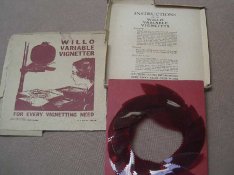
The way it used to be done...
 

Attachments

  • vignetter.jpg
    vignetter.jpg
    50.2 KB · Views: 168
Interesting image, Whiteymorange.

I would personally try the saw-tooth effect, that should work pretty good.
 
Photrio.com contains affiliate links to products. We may receive a commission for purchases made through these links.
To read our full affiliate disclosure statement please click Here.

PHOTRIO PARTNERS EQUALLY FUNDING OUR COMMUNITY:


Ilford ADOX Freestyle Photographic Stearman Press Weldon Color Lab Blue Moon Camera & Machine
Top Bottom