
• Welcome to Photrio!
    Registration is fast and free. Join today to unlock search, see fewer ads, and access all forum features.
    Click here to sign up

1st pic is not completely on the film in Hasselblad.

half stop lighter er.jpg

A
half stop lighter er.jpg

  • jhw
  • Jan 12, 2026
  • 0
  • 0
  • 13
sentinels of the door

A
sentinels of the door

  • 3
  • 0
  • 47

Recent Classifieds

Forum statistics

Threads
201,701
Messages
2,828,765
Members
100,895
Latest member
surprisinggoose
Recent bookmarks
0

Quinten

Member
Allowing Ads
Joined
Mar 4, 2005
Messages
335
Location
Amsterdam
Format
Multi Format
When I shoot a roll of APX100 in my Hasselblad the first picture sometimes misses the film by one half picture. Actually the problem must be me or the camera since I had the same problem with a kodak film.

It's wierd since there is only one way to load a film correctly and the hasselblad winder stops by itselves once the film is fully 'loaded'. Also: I don't think I put to much of the film cover in the emty holder when I load, just enough to grip.

I think it's always teh same amount of picture that misses the film, always about 50%

Any thoughts would be more than welcome.

cheers!
Quinten
 

Fintan

Member
Allowing Ads
Joined
Jan 29, 2004
Messages
1,795
Location
Ireland
Format
Multi Format
Quinten said:
It's wierd since there is only one way to load a film correctly

There really isnt, I was loading it wrongly for a month or two after I got mine. Can you describe the loading process, step by step.
 

celeborn

Member
Allowing Ads
Joined
Sep 6, 2005
Messages
21
Format
Medium Format
line up the arrows

When I first got mine I didn't line up the arrows on the film and the insert. I was surprised how much I had to wind.
 

Joe Symchyshyn

Member
Allowing Ads
Joined
Aug 24, 2004
Messages
468
Location
Canada
Format
4x5 Format
Line up the little arrow head on the insert to the arrows on the film (keep turning the film until the arrows show up. Put the insert in the back and wind away... It's likely the issue.

(If you ask yourself "what arrows?", then it's positively the answer)

joe :smile:
 

Jim Charles

Member
Allowing Ads
Joined
Jun 16, 2005
Messages
27
Location
Wenonah, NJ
Format
Multi Format
That is exactly what I did the first time I loaded my Hasselblad. The first picture was half cut off. I had no idea you had to wind it so far.
 

gwatson

Member
Allowing Ads
Joined
Feb 2, 2005
Messages
146
Location
Windsor, UK
Format
Multi Format
Have the same problem with my Mamiya 7. I need to wind the film on past the arrow on the camera back or I lose half the first frame. There is obviously an issue there, but the work-around is so simple, I can't be bothered to investigate further. Thinking back, I think I may have had a similar problem with a Pentax 67. Quite common I guess?

Geoff
 

David A. Goldfarb

Moderator
Moderator
Allowing Ads
Joined
Sep 7, 2002
Messages
20,020
Location
Honolulu, HI
Format
Large Format
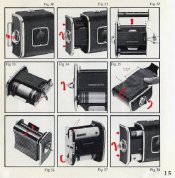
A common problem with new MF shooters. You're looking for two really big arrows on the film backing that are perpendicular to the direction of film travel. Line these up with the arrows (or some cameras have dots) inside the back, then close the back and wind to frame #1. This only applies to cameras and rollfilm backs with automatic frame counters, not those that rely on the red window.
 

Helen B

Member
Allowing Ads
Joined
Jul 1, 2004
Messages
1,590
Location
Hell's Kitch
Format
Multi Format
It doesn't apply to Rolleiflexes with automatic film detection rollers either.
 
OP
OP

Quinten

Member
Allowing Ads
Joined
Mar 4, 2005
Messages
335
Location
Amsterdam
Format
Multi Format
My initial reaction was: "What arrows??".. I'll shoot the remaining frames on my roll today and load a new one while watching for arrows or dots.

It doesn't sound wierd at all actually, since I use very little of the filmcover while loading. So the windig process probably doesn't go far enough to reach the first frame....

Ohh it's all so simple when I think of it.

cheers and many thanks for the tips!
Quinten
 

Dan Henderson

Member
Allowing Ads
Joined
Feb 6, 2005
Messages
1,880
Location
Blue Ridge,
Format
4x5 Format
not all Hassie magazines have an arrow to line up. I have 2: 1 with the arrow, one without. So I wind the leader on the one without the arrow to where I think it should be, put the film holder in the magazine, and on that one open a window in the back and watch arrows and dots go by until "1" shows. Then I'm ready to shoot.
 
OP
OP

Quinten

Member
Allowing Ads
Joined
Mar 4, 2005
Messages
335
Location
Amsterdam
Format
Multi Format
Well I gues this is the result of never reading a book or manual, you sometimes miss the most simple of things...

I've found the 'arrows' on the filmcover but to be honest: I turned one of my two backs upside down and again but there is nothing that looks like it. Can someone indicate where tehy should be?

cheers!
Quinten
 

Fintan

Member
Allowing Ads
Joined
Jan 29, 2004
Messages
1,795
Location
Ireland
Format
Multi Format
follow each step carefully, especially sliding the film under the metal strip on figure 35
 

Attachments

  • film_loading.jpg
    film_loading.jpg
    79 KB · Views: 151
OP
OP

Quinten

Member
Allowing Ads
Joined
Mar 4, 2005
Messages
335
Location
Amsterdam
Format
Multi Format
Whow thanks Fintan, things could not have been explained any clearer!
 
Photrio.com contains affiliate links to products. We may receive a commission for purchases made through these links.
To read our full affiliate disclosure statement please click Here.

PHOTRIO PARTNERS EQUALLY FUNDING OUR COMMUNITY:


Ilford ADOX Freestyle Photographic Stearman Press Weldon Color Lab Blue Moon Camera & Machine
Top Bottom