• Welcome to Photrio!
    Registration is fast and free. Join today to unlock search, see fewer ads, and access all forum features.
    Click here to sign up

How to scan 35mm negative using digital camera ?

Tar

H
Tar

  • 2
  • 3
  • 80
Queueing

H
Queueing

  • Tel
  • Feb 17, 2026
  • 1
  • 0
  • 77

Forum statistics

Threads
202,292
Messages
2,838,631
Members
101,248
Latest member
danielrgryphon
Recent bookmarks
0

Rosssiiii

Member
Allowing Ads
Joined
Dec 3, 2024
Messages
44
Location
italy
Format
Sub 35mm
hello :smile:

please can someone help me to scan a 35mm film using a digital camera ?

i the past i did it with a medium format and worked fine but i had lot more issues using a 35mm.

because i struggle to keep it flat !

What can i use to do that ? to keep it flat ?

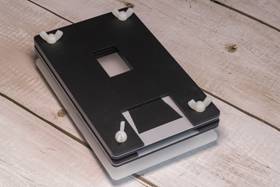
To scan, I place the camera on the column of an enlarger, but I'm having trouble finding the right solution to keep the negative flat with the light underneath... I would need a negative holder and can you recommend something to 3D print that you have already verified works ?

i have a durst neonon 50mm and bellows.

or i need to buy something like that:
 
Last edited:

Don_ih

Member
Allowing Ads
Joined
Jan 24, 2021
Messages
8,704
Location
Ontario
Format
35mm RF
When I do it, I use the negative holder from one of my enlargers - namely, that from my Chomega. But you could rig up something from plastic.
 
OP
OP

Rosssiiii

Member
Allowing Ads
Joined
Dec 3, 2024
Messages
44
Location
italy
Format
Sub 35mm
When I do it, I use the negative holder from one of my enlargers - namely, that from my Chomega. But you could rig up something from plastic.

I use the Valoi Easy 35 https://kamerastore.com/en-ie/pages/easy35. Expensive, but painless to use.
My camera is an APS-C model

the only negative holder i have and is not here with me is that one: durstm302frp09.jpg - Google Drive

but it don't keep the negative flat if is not in the enlarger.

so maybe i need to buy a product like that: Immagine 2026-01-25 171612.jpg - Google Drive

or print a 3d model if any of you have alredy used a model.
 

MattKing

Moderator
Moderator
Joined
Apr 24, 2005
Messages
55,545
Location
Delta, BC Canada
Format
Medium Format
Thread moved to the scanning part of Photrio.
 

_T_

Member
Joined
Feb 21, 2017
Messages
451
Location
EP
Format
4x5 Format
There is no end to the solutions available for holding the film flat, ranging from very cheap to relatively expensive.

It’s even possible to get crafty with it and use an xacto knife or a pair of scissors to cut a couple sheets of black matboard or plastic to shape and glue them together. Sometimes a photographer will already have everything they need on hand to make what they need
 

koraks

Moderator
Moderator
Joined
Nov 29, 2018
Messages
27,742
Location
Europe
Format
Multi Format
It’s even possible to get crafty with it and use an xacto knife or a pair of scissors to cut a couple sheets of black matboard or plastic to shape and glue them together.
That's actually where I'd start. Then complicate matters only to the degree necessary.
 

loccdor

Subscriber
Joined
Jan 12, 2024
Messages
2,949
Location
USA
Format
Multi Format
I also use the essential film holder. It's cheap and works reasonably well (not 100% film flatness but close enough for most work). I alter its assembly a bit to get it closer to the light source so it doesn't leak so much light in the room and cause gradients in the image. It's just a few layers of plastic with 4 plastic screws holding them together.

Note that it does not work well with the Cs-Lite by itself, you need a cage for it to pair with it because its feet are almost exactly where the uneven parts of the Cs-Lite is. I got a metal cage with rubber feet for it from a Photrio member, before that I was using a DIY solution of a clear piece of plastic which did not work so well. Or you can just use a larger light source than the Cs-Lite.

I've also used plastic slide mounts, or anti-newton ring glass slide mounts, for more important work. It's slower than the essential film holder, but keeps film flatter.

Use a lens hood around the film holder and mask off any light that is not coming through the film frame. Very important especially on color negative. Inspect focus carefully to make sure plane is parallel.

I have a big roll of gaffer's tape for masking and fastening this stuff together to reduce stray light.
 

xkaes

Subscriber
Allowing Ads
Joined
Mar 25, 2006
Messages
5,217
Location
Colorado
Format
Multi Format
I'm not familiar with your enlarger, but some people do the exact opposite of what you are doing. Put the film in the enlarger, and use the enlarger as the light source and film holder. You can even use the enlarging lens as the optic (it's reversed, as it should be, for best quality). Since you are in a darkroom, you don't need to worry about stray light.

That's basically what PRO slide copiers are -- an enlarger upside down -- with the camera taking pictures of the negative/slide in the enlarger.
 

runswithsizzers

Subscriber
Joined
Jan 19, 2019
Messages
2,047
Location
SW Missouri, USA
Format
Multi Format
I use an LED flat light box from Amazon
Then it seems like a negative carrier from an enlarger should work? With some LED light boxes, the negative must be elevated above the surface of the light by some amount to prevent the texture or pattern from the light source being in focus with the negative.

I should add, the enlarger negative carriers can sometimes be found on the used market for more-or-less reasonable prices.
 
Last edited:

Paul Howell

Subscriber
Allowing Ads
Joined
Dec 23, 2004
Messages
10,184
Location
Scottsdale Az
Format
Multi Format
If you have a mirrorless digital you can find an bellows and slide duplicator such as Nikon, Minolta, Konica, Pentax, along with an adapter. I use a Pentax M42 bellows and slide duplicator on my Sony A mount, full frame or APS, M42 has the same film to flange distance as Sony A mount.
 

Willy T

Subscriber
Joined
Sep 2, 2016
Messages
188
Location
midatlantic
Format
35mm
Sure; I believe many people have used negative carriers.

I've never had a light source patterning problem but you can't go by me -

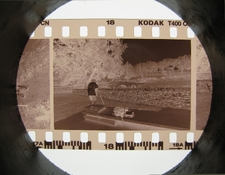
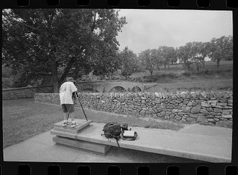
my first foray into negative scanning (c. 2011?) was on the cheap, quick-and-dirty via a neg laid on the light box, then shot down through a matte-black painted "cardboard tube" (aka, a toilet paper roller) by resting a little Canon point and shoot (which had a nice minimum focusing distance - the SD1100is) atop it.

Later, I used a short piece of black-painted pvc pipe to do the same thing.
Worked well enough for my prosaic purposes
(pretty downsized here; contrast was later corrected in PSE12)
 

Attachments

  • superdownsizedburnsidenegjpg.jpg
    superdownsizedburnsidenegjpg.jpg
    1.3 MB · Views: 32
  • JohnBurnsideCorrectedjpg.jpg
    JohnBurnsideCorrectedjpg.jpg
    1.8 MB · Views: 31

runswithsizzers

Subscriber
Joined
Jan 19, 2019
Messages
2,047
Location
SW Missouri, USA
Format
Multi Format
Sure; I believe many people have used negative carriers.

I've never had a light source patterning problem but you can't go by me -

my first foray into negative scanning (c. 2011?) was on the cheap, quick-and-dirty via a neg laid on the light box, then shot down through a matte-black painted "cardboard tube" (aka, a toilet paper roller) by resting a little Canon point and shoot (which had a nice minimum focusing distance - the SD1100is) atop it.

Later, I used a short piece of black-painted pvc pipe to do the same thing.
Worked well enough for my prosaic purposes
(pretty downsized here; contrast was later corrected in PSE12)

@Willy T, your example shot looks good, so this may not apply to you.

It is worth mentioning that any bright light shining directly into the lens can cause a loss of contrast due to flare / glare. It might be better to have a mask which blocks all light from outside of the image area, including the sprocket holes. The amount of flare will vary from lens to lens, so if your lens is not affected, then great. But in general, my advice would be to mask everything except the image area.

Having the mask extend right up to the edge of the image might also make the mask more effective in keeping the negative flat.
 

Willy T

Subscriber
Joined
Sep 2, 2016
Messages
188
Location
midatlantic
Format
35mm
@Willy T, your example shot looks good, so this may not apply to you.

It is worth mentioning that any bright light shining directly into the lens can cause a loss of contrast due to flare / glare. It might be better to have a mask which blocks all light from outside of the image area, including the sprocket holes. The amount of flare will vary from lens to lens, so if your lens is not affected, then great. But in general, my advice would be to mask everything except the image area.

Having the mask extend right up to the edge of the image might also make the mask more effective in keeping the negative flat.

Mais oui! Oh, ah, soon enough thought to mask out spillover from excess light, but though my crude processes have evolved a little, my approach has remained more cookbook than textbook - most folks here are more professional, serious-minded in their approaches
 
Last edited:

xkaes

Subscriber
Allowing Ads
Joined
Mar 25, 2006
Messages
5,217
Location
Colorado
Format
Multi Format
A upside-down enlarger. I use the same thing but with bellows lenses and process lenses which at designed for 1:1 and higher magnifications. Enlarging lenses are not.
 
OP
OP

Rosssiiii

Member
Allowing Ads
Joined
Dec 3, 2024
Messages
44
Location
italy
Format
Sub 35mm

ChrisGalway

Subscriber
Allowing Ads
Joined
Feb 24, 2022
Messages
579
Location
Ireland
Format
Medium Format
It depends on the lens and where the principle plane of the lens is wrt to the back of the lens (lens mount). For example, for a Fuji X mount body. the lens mount is 17.7 mm from the detector. Are you using a camera lens or an enlarger lens (surely not the latter!)?

Personally, I'd look for a used macro lens (or a new TT Artisans or similar) and a sturdy copy stand, at least if you are going to do this regularly. (I realise this might not be the cheapest solution, but you'll get excellent results.)

Certainly no need to take more than one image, just take one good one of each negative.
 

Don_ih

Member
Allowing Ads
Joined
Jan 24, 2021
Messages
8,704
Location
Ontario
Format
35mm RF
is adviced to take a single capture or more then one and merge ?

Depends what you want from the photo. If you want to make the largest possible digital print from your negative, maybe you'll want to do that. If you just want to post photos on Instagram, it's complete overkill.
 

runswithsizzers

Subscriber
Joined
Jan 19, 2019
Messages
2,047
Location
SW Missouri, USA
Format
Multi Format
using a 50mm lens on column of an enlarger with apsc body, how much distant had to stay that 50mm lens from the camera sensor ?
If I understand correctly, you are asking what kind of extension you need between a 50mm lens and the camera to get the correct magnification to copy 35mm film with an APS-C sensor? Right?

and you are using...
i have a durst neonon 50mm and bellows

There are formulas that allow you to calculate the amount of extension needed for a given magnification, but they are hard to use if you need to know the exact measurement, down to within a few millimeters. If you have all the parts, the easiest way to find out what kind of distances are needed is to just try it.

When using a 50mm lens on bellows, there is a slight possibility the thickness of your bellows, plus any adapters you need, may result in too much magnification. In other words, when your bellows is fully closed, and your lens is as close to the camera sensor as possible, then the image of the negative may be too big to fit on the sensor. If so, then trying to copy the negative with one shot means you must crop off some of the negative.

Whether you have this problem or not depends on the minimum thickness of your bellows and what adapters you use to attach the lens and camera to the bellows. If using a 60mm or 75mm enlarger lens, then this is much less likely to be a problem. If your minimum extension results in too much magnification, then you can either get a longer lens -- or you can take more than one shot and stitch the digital images together with software.

Personally, I use an APS-C camera to copy 35mm film in one shot and I am happy with the results. I do combine two shots when copying 6x6cm negatives, but not for 35mm.
 

koraks

Moderator
Moderator
Joined
Nov 29, 2018
Messages
27,742
Location
Europe
Format
Multi Format
is adviced to take a single capture or more then one and merge ?
Start with one; complicate matters only if necessary. Odds are it's not necessary.

using a 50mm lens on column of an enlarger with apsc body, how much distant had to stay that 50mm lens from the camera sensor ?
For 1:1 enlargement somewhere around 80mm give or take, but that's between nodal point of the lens and the sensor. Lens-negative distance will be around 130mm. Unless the 50mm is an actual macro lens, you will need an extension tube to increase the distance between the lens and the camera as a regular 50mm lens will not be able to focus this closely.
 
Photrio.com contains affiliate links to products. We may receive a commission for purchases made through these links.
To read our full affiliate disclosure statement please click Here.

PHOTRIO PARTNERS EQUALLY FUNDING OUR COMMUNITY:


Ilford ADOX Freestyle Photographic Stearman Press Weldon Color Lab Blue Moon Camera & Machine
Top Bottom