QTR digi-negs through Capture One, not PS

Recent Classifieds

Forum statistics

Threads
201,040
Messages
2,818,034
Members
100,492
Latest member
tsang28
Recent bookmarks
2

MurrayMinchin

Membership Council
Subscriber
Allowing Ads
Joined
Jan 9, 2005
Messages
5,560
Location
North Coast BC Canada
Format
Hybrid
Hi there,

Anyone making enlarged digital negatives with QuadToneRip & Print Tool through Capture One rather than Photoshop?

I haven't opened Lightroom since I got Capture One, but have been paying the monthly fee for Photoshop thinking I'll need it when I (finally) start to make digitally enlarged negatives.

I'd rather cancel the Adobe subscription (retired now...pinching pennies) and use Capture One.

Anybody doing this? Thoughts?

Thanks,

Murray
 
  • nmp
  • Deleted
  • Reason: redundant
OP
OP
MurrayMinchin

MurrayMinchin

Membership Council
Subscriber
Allowing Ads
Joined
Jan 9, 2005
Messages
5,560
Location
North Coast BC Canada
Format
Hybrid
Bump...

May have found a work-around for making digitally enlarged negatives destined for salt prints without using Photoshop, which QTR and Mrhar's Easy Digital Negatives (and others) seem to require.

Have been post processing images with Capture One, export to a Desktop folder for 'finished' variants, open with Print Tool, use Epson ABW with appropriate density and yellow added, invert and flip, then send to an Epson P600 to print.

I'm in the ballpark with a solid (for a salt print) black, good separation in the low tones, and a good density in the negative for pure white at the max black printing time, but the mid tones are mush and the high textured tones are on a razors edge so lose texture fast. Have been using a 21 step wedge and a test image so far, but the step wedge couldn't be modified in Capture One. Have only made 10 prints so far, so definitely at the bottom of the learning curve.

Just found a 101 step wedge TIFF file at http://www.easydigitalnegatives.com/downloads/ that can be modified in Capture One using the Levels and Curve sliders. Will find out tomorrow if I can get a normal looking step wedge by adjusting the curve shape manually. After that, hopefully my test image will look good!

May be a futile endeavour, but my coating skills are getting better and I'm starting to feel more comfortable with the processing.

Being retired, I have time to waste 👍 😎👍

Anybody else using Capture One to make digitally enlarged negatives? Got any tips?
 
Last edited:

koraks

Moderator
Moderator
Joined
Nov 29, 2018
Messages
25,923
Location
Europe
Format
Multi Format
using Photoshop, which QTR and Mrhar's Easy Digital Negatives (and others) seem to require.

I think Mrhar's solution is indeed a Photoshop script, but QTR certainly doesn't require photoshop. Its linearization tool runs fine stand-alone. Just prepare your images in whatever software you prefer, save as 16 bit TIFF and then load it in QTR.

I find the advantage of QTR is that once you've linearized a curve, printing is very straightforward since no scripts, adjustment layers etc. have to be applied to each individual file. Just print from QTR with the desired profile selected and QTR does the rest.

I haven't done this with Capture One, but use GIMP - since the workflow only relies on QTR and TIFF files, it's inconsequential which photo editor is used at the front end of the process.
 
OP
OP
MurrayMinchin

MurrayMinchin

Membership Council
Subscriber
Allowing Ads
Joined
Jan 9, 2005
Messages
5,560
Location
North Coast BC Canada
Format
Hybrid
I think Mrhar's solution is indeed a Photoshop script, but QTR certainly doesn't require photoshop. Its linearization tool runs fine stand-alone. Just prepare your images in whatever software you prefer, save as 16 bit TIFF and then load it in QTR.

I find the advantage of QTR is that once you've linearized a curve, printing is very straightforward since no scripts, adjustment layers etc. have to be applied to each individual file. Just print from QTR with the desired profile selected and QTR does the rest.

I haven't done this with Capture One, but use GIMP - since the workflow only relies on QTR and TIFF files, it's inconsequential which photo editor is used at the front end of the process.
Hi, and thanks for making me dig further into "Digital Negatives with QuadToneRIP" by Reeder & Anderson.

I don't have a densitometer, so thought my only path to linearization with QTR was through photoshop, but the book does describe how to take a stab at it by hand. Daunting stuff for non-techy types like me.
 

koraks

Moderator
Moderator
Joined
Nov 29, 2018
Messages
25,923
Location
Europe
Format
Multi Format
I don't have a densitometer, so thought my only path to linearization with QTR was through photoshop

I admit I used a photospectrometer to measure the step densities, but I would have gotten to the same point by scanning a step wedge print with a regular flatbed scanner and then measuring the step densities in e.g. GIMP.

Daunting stuff for non-techy types like me.

Yeah, my main issue with QTR is that the linearization process isn't very accessible. It involves a lot of trial and error. I found the description in the carbon printing book by Sandy King et al. informative; I followed that mostly and then improvised from there. I think there's also a manual online somewhere that I used to do it with a photospectrometer, but in the end I did have to figure out a couple of things on my own by experimenting.
 

Rolleiflexible

Member
Allowing Ads
Joined
Mar 22, 2005
Messages
2,194
Location
Mars Hill, NC
Format
Multi Format
FWIW I refuse to use Photoshop and I have had no problem incorporating QTR into my workflow for making digital negatives without PS.

For preparing the JPG for printing, I use Affinity Photo. It works much like PS -- 90 percent of the commands are the same -- but it costs $40 (on sale now). So if you know the PS environment but want to ditch the Adobe subscription, here's your path forward.

I export 16-bit TIFFs from Affinity for making the negatives and print them through the QTR Print Tool. Easy.

For making the QTR curves, I use a program by Richard Boutwell called QuickCurve-DN. You (1) run a test strip with your light and chemistry to find how long it takes to get the densest black; (2) print a step chart at that exposure to determine how much ink it takes to block light entirely; (3) plug that number into QuickCurve and have it generate a start curve; (4) print a step chart with your workflow using that start curve; and (5) read the light values off that chart and plug them back into QuickCurve, which then linearizes the start curve based on the step chart readings. Usually, the revised curve is in the ballpark, but you can relinearize using the same workflow if need be.

The only obscure part of this process is reading the light values off the step chart. But here again, there are easy solutions. There is a $60 colorimeter called a Color Muse, available on Amazon, that is made for matching paints but works perfectly well for linearizing step charts. Clay Harmon has figured out how to incorporate the Color Muse into the linearization, and has even developed a 40-step chart, sized for the Color Muse, that QuickCurve can use. Here's a link to Clay's Color Muse work:


Once QuickCurve has generated your curve, you simply install it into QTR using the QTR installer. Then, when you print your TIFF through Print Tool, you call up the curve in the print setup dialog box.

I apologize for writing at such length. I spent the better part of a year learning this stuff. No one part of this workflow is difficult, so long as you have the software and a Color Muse. But it does take some trial and error to master. And as you get better handling your chemistry and paper, you will likely need to go back and relinearize your curves. And even now, having believed that I had ironed out the bugs, I will occasionally print a negative that makes me realize that my transitions in one part of the grayscale are lacking, and have to go back to refine the curve to fix the gap.

I hope this helps.

 
Last edited:

Rolleiflexible

Member
Allowing Ads
Joined
Mar 22, 2005
Messages
2,194
Location
Mars Hill, NC
Format
Multi Format
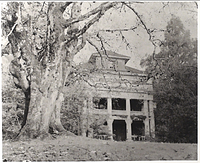
If you are curious about whether this approach makes printable negatives, here's a platinum-toned kallitype I printed a couple of weeks ago from an enlarged digital negative generated this way, from two scanned Rolleicord negatives on Fomapan 200:

full
 
OP
OP
MurrayMinchin

MurrayMinchin

Membership Council
Subscriber
Allowing Ads
Joined
Jan 9, 2005
Messages
5,560
Location
North Coast BC Canada
Format
Hybrid
FWIW I refuse to use Photoshop and I have had no problem incorporating QTR into my workflow for making digital negatives without PS.

For preparing the JPG for printing, I use Affinity Photo. It works much like PS -- 90 percent of the commands are the same -- but it costs $40 (on sale now). So if you know the PS environment but want to ditch the Adobe subscription, here's your path forward.

I export 16-bit TIFFs from Affinity for making the negatives and print them through the QTR Print Tool. Easy.

For making the QTR curves, I use a program by Richard Boutwell called QuickCurve-DN. You (1) run a test strip with your light and chemistry to find how long it takes to get the densest black; (2) print a step chart at that exposure to determine how much ink it takes to block light entirely; (3) plug that number into QuickCurve and have it generate a start curve; (4) print a step chart with your workflow using that start curve; and (5) read the light values off that chart and plug them back into QuickCurve, which then linearizes the start curve based on the step chart readings. Usually, the revised curve is in the ballpark, but you can relinearize using the same workflow if need be.

The only obscure part of this process is reading the light values off the step chart. But here again, there are easy solutions. There is a $60 colorimeter called a Color Muse, available on Amazon, that is made for matching paints but works perfectly well for linearizing step charts. Clay Harmon has figured out how to incorporate the Color Muse into the linearization, and has even developed a 40-step chart, sized for the Color Muse, that QuickCurve can use. Here's a link to Clay's Color Muse work:


Once QuickCurve has generated your curve, you simply install it into QTR using the QTR installer. Then, when you print your TIFF through Print Tool, you call up the curve in the print setup dialog box.

I apologize for writing at such length. I spent the better part of a year learning this stuff. No one part of this workflow is difficult, so long as you have the software and a Color Muse. But it does take some trial and error to master. And as you get better handling your chemistry and paper, you will likely need to go back and relinearize your curves. And even now, having believed that I had ironed out the bugs, I will occasionally print a negative that makes me realize that my transitions in one part of the grayscale are lacking, and have to go back to refine the curve to fix the gap.

I hope this helps.
Thanks, it helps a whole bunch. I've also got a copy Harmon's "Polymer Photogravure" so I'll rummage around in there for nuggets as well, in case there are some direct to plate parallels.

Some people easily swim in the tech end of the pool...Adams, Harmon, Boutwell, Reeder, Mrhar, Harrington, etc. Then there are the Weston's of this world, who through time and effort acquire an intuitive understanding of the processes involved.

I wander around in the middle somewhere, but lack the comfort/knowledge/understanding of anything computer related to easily jump the first hurdles.

I'll post a photo of a salt print using my manual curve, but for some reason, the computer isn't uploading my cameras SD card. See what I mean?

Computers...grrrrrr...
 
Last edited:

koraks

Moderator
Moderator
Joined
Nov 29, 2018
Messages
25,923
Location
Europe
Format
Multi Format
For making the QTR curves, I use a program by Richard Boutwell called QuickCurve-DN.

Oh cool, I read about that, but never looked into it seriously. Thanks for your writeup; it's very clear and compelling!

Some people easily swim in the tech end of the pool...Adams, Harmon, Boutwell, Reeder, Mrhar, Harrington, etc. Then there are the Weston's of this world, who through time and effort acquire an intuitive understanding of the processes involved.

I know what you mean. Technically I fit quite well into the former category, but the latter category is the one that I find more fun. It's a dilemma.
 
OP
OP
MurrayMinchin

MurrayMinchin

Membership Council
Subscriber
Allowing Ads
Joined
Jan 9, 2005
Messages
5,560
Location
North Coast BC Canada
Format
Hybrid
SD card problem solved...sort of. Camera was sending images to card #2. Again, grrrrr...

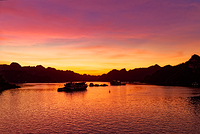
Here are some quick & dirty copies of my first salt prints which are gold toned.

First one shows a good 'black' but high tones are blank, so Epson ABW and P600 are definitely up to the task. (Made the stop corners max black and max white as reference points and have since figured out how to flip them horizontally).

Second one is about print #8, with ink density lowered, a bit less yellow, and an attempt at creating a curve manually in Capture One. Close, but there should be some textures/density in the foreground boats.

My wife is seeing me as full on manic depressive what with all my mood swings depending on what's coming out of the darkroom!

_MXT2255.jpg


_MXT2256.jpg
 
Last edited:
OP
OP
MurrayMinchin

MurrayMinchin

Membership Council
Subscriber
Allowing Ads
Joined
Jan 9, 2005
Messages
5,560
Location
North Coast BC Canada
Format
Hybrid
Didn't there used to be one, back around the turn of the century?
 
Photrio.com contains affiliate links to products. We may receive a commission for purchases made through these links.
To read our full affiliate disclosure statement please click Here.

PHOTRIO PARTNERS EQUALLY FUNDING OUR COMMUNITY:


Ilford ADOX Freestyle Photographic Stearman Press Weldon Color Lab Blue Moon Camera & Machine
Top Bottom