
Pt/Pd digital negative platen gap setting for Epson P900 pizza wheel issue on pictorico

Recent Classifieds

Forum statistics

Threads
201,043
Messages
2,818,066
Members
100,493
Latest member
Jhandyvondandy
Recent bookmarks
1

LaniD

Member
Allowing Ads
Joined
Nov 3, 2023
Messages
50
Location
Seattle, WA
Format
Multi Format
Hello, I'm back to photrio and after many trial and error negatives and prints has anyone settled on a favorite platen gap setting on the P900 for pt/pd digital negs? I'm at 3.5 platen gap with paper thickness at 1.5 and dry time of 10 and not getting the marks. Yipee but
it takes forever to get a digital neg printed out. I got the marks showing up again at 2.5 dry time and 0.4 thickness after gradually trying to increase speed so went back to the lengthy setting of 1.5 and 10. I'm wondering if the platen gap setting should change for a better quality of print. I thought I read somewhere to keep the gap narrow to medium any thoughts? And by the way Epson has been nicer to me lately and one fellow there actually told me to max out the dry time and the thickness...
 

fgorga

Member
Joined
Aug 31, 2015
Messages
819
Location
New Hampshire
Format
Multi Format
The dry time is what is slowing things down, the gap has no bearing on the print speed. Unfortunately, there is no way around that.

I don't view the slow print time as a problem.

Best practices suggest that you need to let digital negatives dry for a significant length of time after printing... some dry for only an hour, others (including me) let negatives dry overnight. There are changes in the density of the negative as it dries.

Then, of course, there is all the time involved actually making the print, so the the time involved in printing a negative is only a very small fraction of the total time required to make a print.
 
OP
OP
LaniD

LaniD

Member
Allowing Ads
Joined
Nov 3, 2023
Messages
50
Location
Seattle, WA
Format
Multi Format
Thank you so much for your great info I put this latest neg onto my drying rack for overnight!
 
OP
OP
LaniD

LaniD

Member
Allowing Ads
Joined
Nov 3, 2023
Messages
50
Location
Seattle, WA
Format
Multi Format
Thank you. I had a whole bunch of threads earlier on pizza wheel marks for digi negs and pt/pd and Ron Nelson commented with the Euro link to upgrade with this while the US didn't get it. I finally got an answer from Epson that said my warranty would stay intact if I loaded this upgrade but they wouldn't be able to necessarily service my printer... anyway since I'm not getting the marks now I may stick with these slower settings. If that changes I may try this.
 
OP
OP
LaniD

LaniD

Member
Allowing Ads
Joined
Nov 3, 2023
Messages
50
Location
Seattle, WA
Format
Multi Format
The dry time is what is slowing things down, the gap has no bearing on the print speed. Unfortunately, there is no way around that.

I don't view the slow print time as a problem.

Best practices suggest that you need to let digital negatives dry for a significant length of time after printing... some dry for only an hour, others (including me) let negatives dry overnight. There are changes in the density of the negative as it dries.

Then, of course, there is all the time involved actually making the print, so the the time involved in printing a negative is only a very small fraction of the total time required to make a print.

Hi again,
By the way what are your paper settings for pt/pd on the Epson may I ask?
 

jeffreyg

Subscriber
Allowing Ads
Joined
Jun 12, 2008
Messages
2,751
Location
florida
Format
Medium Format
I’m using an Epson 3880 with Pictorico with the paper set as luster and 1440 dpi I get very good results. I also enlarge negatives on to x-ray duplicating film which is great but has become expensive. The duplicating film is easy to use, very slow but can’t be beat.
 

fgorga

Member
Joined
Aug 31, 2015
Messages
819
Location
New Hampshire
Format
Multi Format
Hi again,
By the way what are your paper settings for pt/pd on the Epson may I ask?

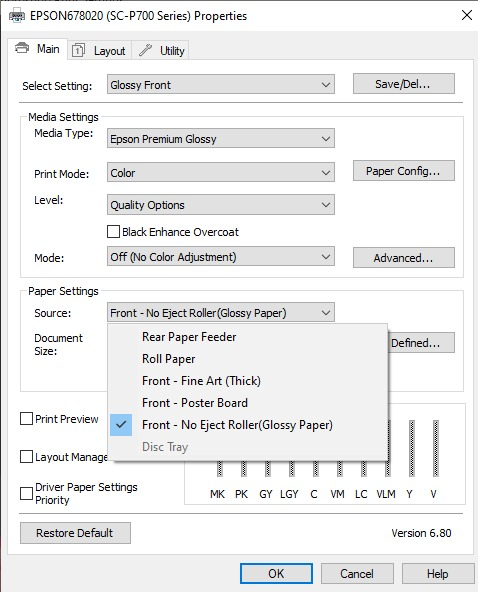
Here are the settings I currently use with my P800:

P800 Settings (Dig neg).JPG

These settings have evolved over time from the settings I used on a 3880, which in turn evolved from settings for a 1440 (I think). Of course the curves applied in Photoshop have also evolved and are different for each process. However, I use these settings for all processes.

My negative files are monochrome (black & white) but they are in the sRGB color space and I print them as 'color' images.

I also mirror my images in the Photoshop print dialog rather that in the printer settings. I have no clue why, just that I've always done it that way!

I make no claim that these are the ideal settings, but they work for me.
 
OP
OP
LaniD

LaniD

Member
Allowing Ads
Joined
Nov 3, 2023
Messages
50
Location
Seattle, WA
Format
Multi Format
Thank you that's interesting your paper thickness and dry time are close to mine. It has been a steep learning curve so to speak for me. I've heard the P800 is better for this. Anyway the P900 had a few changes. And I use the Bostick and Sullivan curve for pt/pd...Thank you again!
 

carioca

Member
Allowing Ads
Joined
Nov 16, 2005
Messages
114
Location
Paris
Format
Multi Format
P800 or P900, using the front load and OHP taped on a poster board results in zero pizza wheel marks for digital negs. Front load mode disengadges the pizza rollers (tested on both printers).
 
OP
OP
LaniD

LaniD

Member
Allowing Ads
Joined
Nov 3, 2023
Messages
50
Location
Seattle, WA
Format
Multi Format
Thanks. When you did this on the P900 how thick was your posterboard? I tried front loading with really thick paper or some kind of board (I didn't have any "posterboard" but will get some) and it didn't work. Did you do the Epson Euro upgrade from 2022 to your P900?
 

carioca

Member
Allowing Ads
Joined
Nov 16, 2005
Messages
114
Location
Paris
Format
Multi Format
Thanks. When you did this on the P900 how thick was your posterboard? I tried front loading with really thick paper or some kind of board (I didn't have any "posterboard" but will get some) and it didn't work. Did you do the Epson Euro upgrade from 2022 to your P900?
No Euro upgrade.
I'm using the original Epson posterboard, it has the perfect thickness and stiffness. I cut off small strips of the sticky part of '3M Post-it' notes to fix the OHP onto the posterboard, they're sticky enough to hold the film securely, and release easily after printing.
I have also turned off the 'Meandering' setting in the Epson printer menu (this prevents posterboard feed problems).
 
OP
OP
LaniD

LaniD

Member
Allowing Ads
Joined
Nov 3, 2023
Messages
50
Location
Seattle, WA
Format
Multi Format
Another question. Where is the 'meandering' setting on the P900 I didn't see that or is it something that comes up when you front load? Also fyi that Epson poster board is hard to find as everyone seems to be 'out of stock' but I may have found a substitute at 50ml thick. I'm still getting the dang marks after resetting everything last night to 150 and 10 and I thought I'd gotten rid of them so I'm ready to try this suggestion. Otherwise I'm stuck printing 2 6x9' on 11x17 from 4x5 negs. Ok now I'm whining...
 

carioca

Member
Allowing Ads
Joined
Nov 16, 2005
Messages
114
Location
Paris
Format
Multi Format
Another question. Where is the 'meandering' setting on the P900 I didn't see that or is it something that comes up when you front load? Also fyi that Epson poster board is hard to find as everyone seems to be 'out of stock' but I may have found a substitute at 50ml thick. I'm still getting the dang marks after resetting everything last night to 150 and 10 and I thought I'd gotten rid of them so I'm ready to try this suggestion. Otherwise I'm stuck printing 2 6x9' on 11x17 from 4x5 negs. Ok now I'm whining...

Sorry for the late reply.
It's in the Printer Settings: 'Detect Paper Meandering'
This should be turned off.
 
Photrio.com contains affiliate links to products. We may receive a commission for purchases made through these links.
To read our full affiliate disclosure statement please click Here.

PHOTRIO PARTNERS EQUALLY FUNDING OUR COMMUNITY:


Ilford ADOX Freestyle Photographic Stearman Press Weldon Color Lab Blue Moon Camera & Machine
Top Bottom