


Firstly let me declare a financial interest in the program called TruNeg referred to in this post and that I am the creator of that program. The principle behind TruNeg is that there is such a thing as a perfect reversal of the positive image. In view of my commercial interest in this I have consulted with Sean and he thought the post may be of use.
Having devised TruNeg to make negatives for my carbon prints I decided to make a cyanotype using the Gold Street Studio Cyanotype kit. The Canon iP8760 A3+ printer I use has two black inks and one grey and works perfectly for the carbon prints, but with cyanotype having a bit of a mixed reputation when it comes to the negative required, I was concerned that it would not have enough contrast.
TruNeg uses a Control Negative to establish the exposure and contrast of the printer/analogue combination. The negative consists of three identical test strips with a series of single RGB steps from 6 to 30 and a series of 10 RGB steps from 120 to 240.
The printer settings for the iP8760 are pretty standard, Media: Photo Paper Plus Glossy II, Quality: High, Intensity:+6, Grayscale Printing: Ticked, Canon iP8700 series XPS printer driver, Photoshop Manages Color, Printer Profile: Canon iP8700 series GL3, “Normal Printing”, Rendering: Absolute Colorimetric, Black Point Compensation: Not Ticked. No wonder things can get complicated with so many variables, particularly when you are never quite sure what exactly they are doing!!
For my carbon “emulsion” I pre-sensitize the gelatin with 0.7ml of 5% Ammonium Dichromate per 20ml gelatine, pour it onto a 9x4 inch aluminium plate and dry it in a low humidity drying cabinet where it will keep for two or three days. As I have no idea of how this relates to brush sensitizing I am unsure whether the negative contrast is high or low.
After printing the Control Negative I sensitized a 9x4 inch piece of Saunders Waterford Hot Pressed High White 425 GSM watercolour paper. My standard carbon exposure is 18 minutes so I made three exposures of 8, 16 and 32 minutes a stop apart hoping to have one under and one over.

From my earlier comments about contrast I was surprised at how well the Canon iP8760 negative performed, if anything the negative maybe a little too contrasty.
Clearly the 8 and 16 min exposures are too light. The 32 min. exposure is nearly there for the Dmax but there is very little tone in the tones RGB 28 to 30. On the original test strip rgb 240 merges into the Dmax but the other tones are separated. As TruNeg can make a curve from any two “just white” and “just black” there is no need to aim for a particular result, as long as we can find a tone that is just visible from Dmax and a clean white we are OK. I decided to make another darker test strip at 40, 60, 80 minutes. As you can tell, my UV light box is not very bright and if I was doing lots of cyanotypes I would need to look at up grading it, though with long exposures you can make use of the time doing other things.

There is what looks like a faint blue haze over parts of the test which I put down to the test being not properly dried when exposed, but don’t know for sure and will ignore it at this stage. The 40 min exposure is still very light in the 25 to 30 RGB range with plenty of separation in the dark tones. The 80 min exposure still has separation in some of the dark tones but looks like the RGB 6 is not a clean white.
The TruNeg program needs three negative RGB values to adjust the negative’s contrast and density.
For the 60 minute exposure I chose RGB 8 as being T1 “Just white” and RGB 150 as being the first visible tone from “black”, T14. The 190/200 RGB are not distinguishable from Dmax which suggests that the Dmax is at a maximum at 60 minutes.
I selected RGB 23 for the tone that represents T2 on the Truneg Step Wedge below. The step wedge is an exponential series of tones with an exponential constant of 1.24 and the brightness change between T1 & T2 is the same as T2 & T3, T3 &T4 etc when measured on a monitor with a light meter in EVs or in density in a perfect print.

Because of the effect of the toe of the analogue’s DlogE curve a greater increase in exposure between T1 and T2 needs to be allowed for than for the other steps if I am to match the screen. Looking at the test strip and moving up from the white point there is no edge between the steps until about 23 or 24 when the individual steps can be very faintly seen indicating that there is a definite increase in contrast and the worst of the toe is past. Sounds a bit vague but it was not that difficult to visually judge and can be found by comparing the test print with the T1/T2 difference in the stepwedge. As can be seen from this, digital negatives are very sensitive to minor changes to the highlight values and while T2 has a significant effect on the separation in the highlights, as long as I am reasonably close it should be OK and I can easily refine it if needed..
These three RGB values are entered into a spreadsheet which calculates the inputs and outputs for the negative exponential correction curve. (Note that this is not a gamma correction)


The image was opened and inverted and the table of inputs and outputs were entered into a curve dialogue.
The print was exposed for 60 minutes and processed as normal.

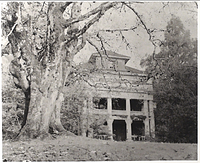
Photograph by the author John Riches from the series Myths Legends & Hallucinations.
My assessment of the print is that RGB 8 for T1 is technically a little dark as the white highlights are a little exaggerated compared with the monitor image. This could be adjusted by increasing RGB 8 to 11 or 12, also the “shadows” are a little open compared with the monitor which again could be modified by lightening T14 from RGB 150 to 160. . Overall I am happy with the print and actually like the lighter highlights and do not feel the need to redo it.
An article in Alternative Photography.com gives a detailed explanation of the theory behind TruNeg https://www.alternativephotography.com/the-true-inverted-digital-negative/
Full details are available at https://www.truneg.com
Having devised TruNeg to make negatives for my carbon prints I decided to make a cyanotype using the Gold Street Studio Cyanotype kit. The Canon iP8760 A3+ printer I use has two black inks and one grey and works perfectly for the carbon prints, but with cyanotype having a bit of a mixed reputation when it comes to the negative required, I was concerned that it would not have enough contrast.
TruNeg uses a Control Negative to establish the exposure and contrast of the printer/analogue combination. The negative consists of three identical test strips with a series of single RGB steps from 6 to 30 and a series of 10 RGB steps from 120 to 240.
The printer settings for the iP8760 are pretty standard, Media: Photo Paper Plus Glossy II, Quality: High, Intensity:+6, Grayscale Printing: Ticked, Canon iP8700 series XPS printer driver, Photoshop Manages Color, Printer Profile: Canon iP8700 series GL3, “Normal Printing”, Rendering: Absolute Colorimetric, Black Point Compensation: Not Ticked. No wonder things can get complicated with so many variables, particularly when you are never quite sure what exactly they are doing!!
For my carbon “emulsion” I pre-sensitize the gelatin with 0.7ml of 5% Ammonium Dichromate per 20ml gelatine, pour it onto a 9x4 inch aluminium plate and dry it in a low humidity drying cabinet where it will keep for two or three days. As I have no idea of how this relates to brush sensitizing I am unsure whether the negative contrast is high or low.
After printing the Control Negative I sensitized a 9x4 inch piece of Saunders Waterford Hot Pressed High White 425 GSM watercolour paper. My standard carbon exposure is 18 minutes so I made three exposures of 8, 16 and 32 minutes a stop apart hoping to have one under and one over.
From my earlier comments about contrast I was surprised at how well the Canon iP8760 negative performed, if anything the negative maybe a little too contrasty.
Clearly the 8 and 16 min exposures are too light. The 32 min. exposure is nearly there for the Dmax but there is very little tone in the tones RGB 28 to 30. On the original test strip rgb 240 merges into the Dmax but the other tones are separated. As TruNeg can make a curve from any two “just white” and “just black” there is no need to aim for a particular result, as long as we can find a tone that is just visible from Dmax and a clean white we are OK. I decided to make another darker test strip at 40, 60, 80 minutes. As you can tell, my UV light box is not very bright and if I was doing lots of cyanotypes I would need to look at up grading it, though with long exposures you can make use of the time doing other things.
There is what looks like a faint blue haze over parts of the test which I put down to the test being not properly dried when exposed, but don’t know for sure and will ignore it at this stage. The 40 min exposure is still very light in the 25 to 30 RGB range with plenty of separation in the dark tones. The 80 min exposure still has separation in some of the dark tones but looks like the RGB 6 is not a clean white.
The TruNeg program needs three negative RGB values to adjust the negative’s contrast and density.
For the 60 minute exposure I chose RGB 8 as being T1 “Just white” and RGB 150 as being the first visible tone from “black”, T14. The 190/200 RGB are not distinguishable from Dmax which suggests that the Dmax is at a maximum at 60 minutes.
I selected RGB 23 for the tone that represents T2 on the Truneg Step Wedge below. The step wedge is an exponential series of tones with an exponential constant of 1.24 and the brightness change between T1 & T2 is the same as T2 & T3, T3 &T4 etc when measured on a monitor with a light meter in EVs or in density in a perfect print.
Because of the effect of the toe of the analogue’s DlogE curve a greater increase in exposure between T1 and T2 needs to be allowed for than for the other steps if I am to match the screen. Looking at the test strip and moving up from the white point there is no edge between the steps until about 23 or 24 when the individual steps can be very faintly seen indicating that there is a definite increase in contrast and the worst of the toe is past. Sounds a bit vague but it was not that difficult to visually judge and can be found by comparing the test print with the T1/T2 difference in the stepwedge. As can be seen from this, digital negatives are very sensitive to minor changes to the highlight values and while T2 has a significant effect on the separation in the highlights, as long as I am reasonably close it should be OK and I can easily refine it if needed..
These three RGB values are entered into a spreadsheet which calculates the inputs and outputs for the negative exponential correction curve. (Note that this is not a gamma correction)
The image was opened and inverted and the table of inputs and outputs were entered into a curve dialogue.
The print was exposed for 60 minutes and processed as normal.
Photograph by the author John Riches from the series Myths Legends & Hallucinations.
My assessment of the print is that RGB 8 for T1 is technically a little dark as the white highlights are a little exaggerated compared with the monitor image. This could be adjusted by increasing RGB 8 to 11 or 12, also the “shadows” are a little open compared with the monitor which again could be modified by lightening T14 from RGB 150 to 160. . Overall I am happy with the print and actually like the lighter highlights and do not feel the need to redo it.
An article in Alternative Photography.com gives a detailed explanation of the theory behind TruNeg https://www.alternativephotography.com/the-true-inverted-digital-negative/
Full details are available at https://www.truneg.com
