
• Welcome to Photrio!
    Registration is fast and free. Join today to unlock search, see fewer ads, and access all forum features.
    Click here to sign up

Fuji Provia with strange yellow stains?

Forum statistics

Threads
204,390
Messages
2,867,847
Members
102,247
Latest member
callmedos
Recent bookmarks
0

CasioCassette

Member
Joined
Jan 30, 2023
Messages
25
Location
Hungary
Format
35mm
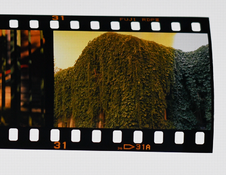
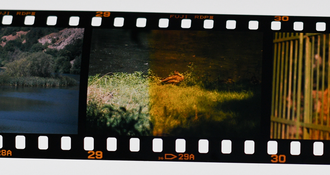
I just got back a roll of Provia from the lab, and wondering what this strange yellow discolouration is on some of the frames. It was a fresh roll of film, stored in the fridge, and shot with my trusty Nikon F100 which has never given me any trouble whatsoever. I had a KR3 filter on the lens throughout the whole roll, as I most often do when shooting slides. Here are two examples of what it looks like on the light table. There are altogether 4 sections on the entire roll that are affected by this yellow color, and at all 4 places the stain spans across at least 2, but no more than 3 frames. I'm thinking this could be a fault at the develoment stage. I've only used this local lab a couple of times but nothing like this has happened with my films before.

Any advice what could have caused this?

Thank you.
 

Attachments

  • provia1.png
    provia1.png
    803.4 KB · Views: 170
  • provia2.png
    provia2.png
    769.2 KB · Views: 169
Development problems. Take the film back to the lab and start asking questions.
 
To me it looks more like a light leak.
 
Light leak with positive density on slide film? How could that happen?
 
Light leak with positive density on slide film? How could that happen?

A darkroom light leak, not a camera light leak.
 
I still don't get it. A light leak is a light leak. It would build additional density on film which would show as lower density after reversal.
 
It is an uneven colour cast, which can happen if a portion of the film is exposed to light - in this case probably tungsten light.
 
I can see it's an uneven cast. I'm asking what kind of ADDITIONAL light causes MORE density in any layer in the positive image.
 
It looks like a slight light leak, but strangely, the base is black as it should be after the reverse. Maybe something during color processing?
 
It looks like a slight light leak, but strangely, the base is black as it should be after the reverse. Maybe something during color processing?

Color developer stage of E-6 process can be done with lights on.

I'm pretty sure it's not a light leak, but I'm curious if anyone can explain how a light leak (camera or darkroom) could look like that...
 
Here is a link to the Kodak E-6 troubleshooting guide: https://125px.com/docs/techpubs/kodak/z119-12.pdf.

From this I'd say it's some issue with the bleach or fixer, but I'm not sure what. Could be an issue with the first developer as well.

I don't see any way a light leak could possibly cause this because, as @brbo has said, that would reduce the density, not increase it.
 
Thanks everyone for the responses.

Today I managed to speak with the lab in person, but they couldn't offer any explanation about what went wrong. They processed my roll with 9 more in fresh E-6 chemicals and the other rolls, they said, came out fine. I just hope this won't happen again to my next roll.
 
Photrio.com contains affiliate links to products. We may receive a commission for purchases made through these links.
To read our full affiliate disclosure statement please click Here.

PHOTRIO PARTNERS EQUALLY FUNDING OUR COMMUNITY:


Ilford ADOX Freestyle Photographic Stearman Press Weldon Color Lab Blue Moon Camera & Machine
Top Bottom