
• Welcome to Photrio!
    Registration is fast and free. Join today to unlock search, see fewer ads, and access all forum features.
    Click here to sign up

Digital Negs: My Blacks are very grainy and too grey

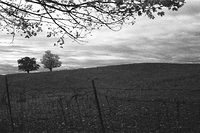
Pasture

A
Pasture

  • 0
  • 0
  • 6
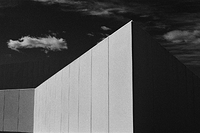
Angular building

A
Angular building

  • 3
  • 1
  • 27

Recent Classifieds

Forum statistics

Threads
201,078
Messages
2,818,681
Members
100,516
Latest member
victorreeds
Recent bookmarks
0

adam lubroth

Member
Allowing Ads
Joined
Nov 14, 2018
Messages
9
Location
madrid spain
Format
DSLR
Doing my first digital negatives using Dan Burkholdre´s book as guide. I am not using a full photo, rather sections of digital images. They look great on the screen, blacks , midtones and white, no grain. The BK´s are 97% in the positive, however, and this is the mystery, when passed through the curve and inverted, the Bk, now should come out somewhat white, yet it comes out 58% grey ... matching the other greys. It is also quite grainy.
Images are Adobe RGB 1998, 16 bit gamma 2.2
I have seen no other reference to this problem and truly puzzled.
Would be most grateful for advice from anyone who has been able to solve my dilemma.

Thanks
Adam

Dig Neg 1.png
 

ced

Member
Allowing Ads
Joined
Oct 10, 2011
Messages
866
Location
Belgica
Format
Multi Format
Put a larger screen capture of the layers that some experts can examine, as a thumbnail it is difficult to figure what gives.
 
OP
OP

adam lubroth

Member
Allowing Ads
Joined
Nov 14, 2018
Messages
9
Location
madrid spain
Format
DSLR
Thanks for taking interest. This is the standard Burkholder layer layout, it is what I use.

Any ideas ?
.
Captura de pantalla 2019-01-06 a la(s) 20.45.56.png
 

Craig75

Member
Allowing Ads
Joined
May 9, 2016
Messages
1,234
Location
Uk
Format
35mm
Are you are using the platinum correction curve rather than silver gelatin curve?

The correction curve has an extremely steep increase in contrast in blacks which looks like it is designed for alternative process printing rather than silver gelatin contact printing curve.
 

nmp

Member
Allowing Ads
Joined
Jan 20, 2005
Messages
2,054
Location
Maryland USA
Format
35mm
Looks normal to me. If I eyeball on the curve, by input of 25 or 30, the output is already past the mid-point of 128 or mid-gray. What looks fairly dark in the original will normally only have some pixels pure black (0) which will trasnslate to pure white after inversion. Others that are close to 0 but not quite will get dramatically darkened. You can check it on the step tablet that I see is the part of the negative.

The graininess you are seeing is because a slight difference in the original shadows is exaggerated as a result of the steepness of the curve in that region - again normal.

I would say do your process and and see the result. Use the step tablet as your guide to make sure that the translation is what it should be.

:Niranjan.
 
OP
OP

adam lubroth

Member
Allowing Ads
Joined
Nov 14, 2018
Messages
9
Location
madrid spain
Format
DSLR
Thank you everybody . Hurray !
Yes, problem much improved. With very very small variations on the steep part of the curve, most grain vanished, and became lighter.
Most amazing. Gracias amigos.
 

nmp

Member
Allowing Ads
Joined
Jan 20, 2005
Messages
2,054
Location
Maryland USA
Format
35mm
Thank you everybody . Hurray !
Yes, problem much improved. With very very small variations on the steep part of the curve, most grain vanished, and became lighter.
Most amazing. Gracias amigos.

So you "fixed" the original image to make the negative look the way you thought it should. Next you are going to wonder why you don't have details in your shadows.
 

Craig75

Member
Allowing Ads
Joined
May 9, 2016
Messages
1,234
Location
Uk
Format
35mm
So you "fixed" the original image to make the negative look the way you thought it should. Next you are going to wonder why you don't have details in your shadows.

This.

Even tiny adjustments in such a steep curve will most likely end up in blocked shadows.

If your crop is small and/or a low res jpeg and/or you are making a big negative then you're image will start getting noisy under such extreme adjustments.
 
OP
OP

adam lubroth

Member
Allowing Ads
Joined
Nov 14, 2018
Messages
9
Location
madrid spain
Format
DSLR
I haven't printed the image yet, but with this particular one I was mostly interested in solid BK. Here is a sample.
The visible grain is now in the same reading as the 95% in the step tablet. Should be almost invisible.
Notice small change in curve.
Will show printed results
True that the crop of image gives noise. I will use my artistic license.
Captura de pantalla 2019-01-07 a la(s) 16.42.33.png
 

Craig75

Member
Allowing Ads
Joined
May 9, 2016
Messages
1,234
Location
Uk
Format
35mm
yes - nothing wrong with some noise - I was thinking more if the shadows might band if the crop is too low res when such a radical adjustment is applied.

Only one way to find out though.

Like Niranjan said thou - I would include a stepwedge with the image - it is highly likely you will need to adjust the basic curve to match your own materials and processing techniques and a step wedge will make that troubleshooting much easier.

good luck - it's a good image to get test everything out with all those blacks and highlights in it
 
OP
OP

adam lubroth

Member
Allowing Ads
Joined
Nov 14, 2018
Messages
9
Location
madrid spain
Format
DSLR
Will gladly post result once I print it. No doubt it will need further adjustment.
The ChartThrob idea sounds good.
Will try it out.
 
Photrio.com contains affiliate links to products. We may receive a commission for purchases made through these links.
To read our full affiliate disclosure statement please click Here.

PHOTRIO PARTNERS EQUALLY FUNDING OUR COMMUNITY:


Ilford ADOX Freestyle Photographic Stearman Press Weldon Color Lab Blue Moon Camera & Machine
Top Bottom
